
The Ticket Stats feature in HITS provides a real-time snapshot of key performance metrics—including ticket count, sales, average ticket value, and profit—based on the results currently displayed on your screen.
Where to Find Ticket Stats
- Located in the top-right corner of the HITS Home Screen
- Displays summary metrics tied directly to your current search results
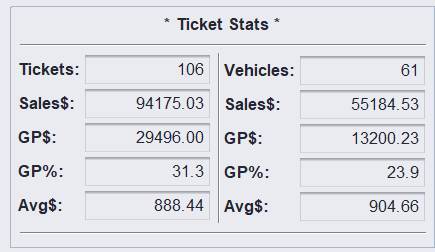
Default View
- HITS defaults to “This Week” (Monday through Sunday)
- The Ticket Stats will automatically reflect activity within this timeframe unless adjusted
How Ticket Stats Works
The most important concept is:
👉 Ticket Stats always reflects the data you are currently filtering on the screen
This means:
- Any changes to Ticket Type or Date Range will immediately update the KPIs
- The totals shown are not static—they are fully driven by your selected criteria
Using Filters to View KPIs
You can control what the Ticket Stats displays by adjusting:
1. Ticket Type
Examples:
- Open Quotes
- Work Orders
- Invoices (closed tickets)

2. Date Range
Examples:
- Current Week (default)
- Specific day
- Last week, quarter, or year

Example Scenarios
Example 1: Open Work Orders
- Filter: Open Quotes + Work Orders
- Date Range: This Week (default)
👉 Ticket Stats will display KPIs only for open tickets during the current week
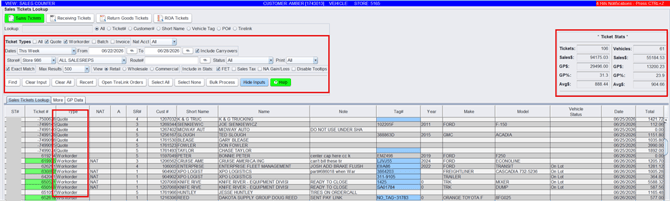
Example 2: Closed Tickets for a Specific Day
- Filter: Ticket Type = Invoices
- Date Range: Specific Date (e.g., May 22)
👉 Ticket Stats will display KPIs only for tickets closed on that date, along with the corresponding invoice list
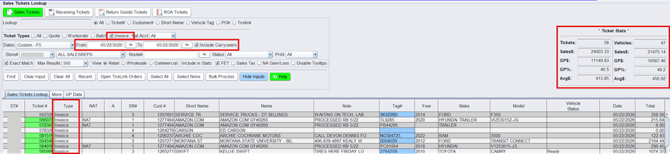
Why This Matters
Using Ticket Stats allows you to:
- ✅ Monitor performance in real time
- ✅ View sales and profitability instantly
- ✅ Apply filters to analyze specific scenarios
- ✅ Make decisions without running reports or leaving HITS
Key Takeaway
Ticket Stats is a filter-driven, real-time KPI tool that updates instantly based on your search criteria—giving you immediate visibility into performance directly within HITS.
✅ Quick Tip:
If your numbers don’t look right, double-check your filters—Ticket Stats only reflects what is currently displayed on your screen.