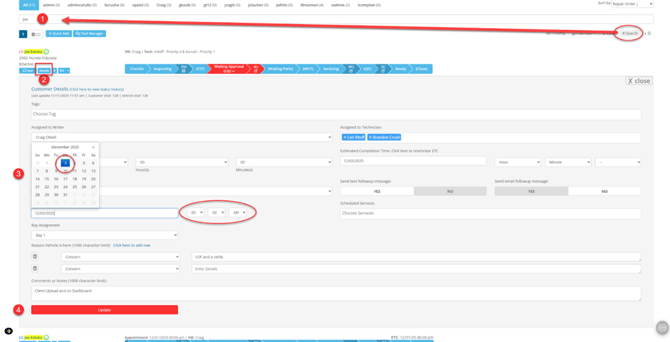
- Find Appointments in Autoflows Active Customer Page (the main dashboard) using Search
- Click Details - This expands into a modal where you can edit appointment date/time
-
For both appointments - adjust the date/time to reflect the actual date and time that the proper vehicle has or will arrive.
- Click the Update button to save your changes.
Notes For When Performing:
When performing the switch make note of the date and time of the first appointment (Appointment A) as this information will be required later. Update the time of the first appointment (Appointment A) to match the time of the second appointment (Appointment B) then save/update the appointment. Then take the information from Appointment A that you made a note of and plug it into Appointment B then save/update the appointment.
Once both switches are performed service as normal can begin as now the proper vehicle is at your shop with its corresponding appointment.